One Brain assistant
Ask about any issue, quote or job. It reads the record you're on, answers in plain English and drafts the message.
One system for everyone who looks after buildings: the landlords who own them, the FM providers who run them and the contractors who fix them. Repairs, planned maintenance, compliance and the money behind them, with AI built into every step.
Everyone works from the same platform, but a landlord, an FM provider and a contractor need different things from it. Pick yours to see what it does for you.
Manage your repairs, planned maintenance and contractors without chasing.
Run reactive and planned work for your clients, with your engineers, subcontractors or both.
Run your trade business from the van: quotes, jobs, certificates and invoices, for one person or a team.
One Command was built with AI at its core, not bolted on. It reads every sheet and invoice that comes in, writes the scopes, reports and messages that go out, and tells your team what needs them next. People stay in charge: nothing is sent or changed until someone approves it.
Ask about any issue, quote or job. It reads the record you're on, answers in plain English and drafts the message.
Every morning it suggests contractors to chase, visits to re-book and jobs drifting over budget, with the drafts ready.
Turns an engineer's findings into a quote scope with the parts named, and writes the scope contractors price against.
Pulls out the date, the work done and anything found, spots a missing signature or the wrong site, and raises the remedials.
Reads the supplier, invoice number, dates and amounts, and finds the job or PO it belongs to.
Chooses each invoice line from your products and services, says why, and writes the description your client reads.
Writes the inspection questions for each issue, checks the answers and asks follow-ups, pre-fills the POWRA and suggests how to approach the job.
Turns what an engineer found on a planned visit into a clear title and description, and flags anything already reported.
Summarises meeting notes into actions for each owner. With One Task, it sorts your inbox and turns emails into tasks.
One record carries the work from the first report to the paid invoice. Tap through a real job to see who does what at each step.
Every edition includes the full platform and the contractor portal. Figures below are examples.
Every service at every site shows as Overdue, Due Soon, Booked or In Date. Each site and client gets a score.
Anyone on site scans a label to see the last visit and report a fault with a photo.
Nothing is sent until you approve it.
Bills checked against the agreed cost, held if they're over, and paid with a bank file.
They sign in with a code emailed to them. No passwords to manage.
Unanswered quotes, missing contractor invoices and supplier bills are chased in office hours. A Monday email lists work done but not invoiced.
These are the apps themselves, shown with example data.
Screens use made-up clients, sites and people.
One Command is set up with your logo, your colours and your name, so your team, clients and contractors see your business, not ours.
Example brands for illustration only. These businesses are made up.
Each add-on plugs straight into One Command, so jobs, reports and tasks flow between them with no double entry. Switch one on when you need it.
Skip it if contractors do all your work. They have the portal.
Skip it if you own the building. You already see it all.
Skip it if your team already runs on another task manager.
Every edition has One Brain AI, the integrations and your own branding. Guide prices are shown below and confirmed at launch.
| LandlordOwners and agents | FM ProviderFM companies | ContractorTrade businesses | |
|---|---|---|---|
| Jobs and repairsLog, track and close every job | ✓ | ✓ | ✓ |
| Manage subcontractorsPrices, instructions, documents and their portal | ✓ | ✓ | Not needed |
| Planned maintenance and complianceSchedules, service sheets and scores | ✓ | ✓ | ✓ |
| Assets and QR labelsReport a fault from a label on site | ✓ | ✓ | ✓ |
| Quote and invoice your own customersApproval links, reminders and invoices | Not needed | ✓ | ✓ |
| Supplier invoices and paymentsRead by AI, matched to the job | ✓ | ✓ | ✓ |
| One SheetEngineers' phone app | Not needed | Optional | ✓ Included |
| One ViewClient portal | Not needed | Optional | Not needed |
| One TaskDay planning and tasks | Optional | Optional | Optional |
| Guide price | From £79/mo up to 10 sites | From £149/mo by team size | From £29/mo by team size |
One Command connects to your accounting software, your email and the other systems your business runs on, so nothing is typed in twice.
Invoices raised and numbered for you. Supplier bills brought in for payment.
Client updates and chasers go from your own mailbox. Diaries stay in step.
Checked service sheets and reports filed where your team keeps them.
Your team signs in with their work account. Van trackers show where each van is.
They serve people a landlord doesn't usually have. One Sheet is for in-house engineers, and your contractors already have their portal. One View is a window for clients, and you are the client. One Task suits a busy office team. The Owner Edition is complete on its own.
Yes. Start with the FM Edition, then switch on One Sheet when you bring engineers in-house, One View when clients ask for a portal, or One Task when the office needs it. Your records are already in One Command.
One Command is coming soon to the open market. It already runs a facilities management business every day, and we're preparing it for landlords, FM providers and contractors. Register your interest and we'll be in touch as places open.
Yes. One Command installs to an iPhone or Android home screen, with a phone layout and notifications. One Sheet is built for engineers on site and keeps working without signal.
It reads what comes in (service sheets, supplier invoices, engineers' answers) and writes what goes out (quote scopes, contractor scopes, client report summaries, invoice descriptions and messages). One Brain answers questions about any record and suggests what to chase each morning. It never sends or changes anything until a person approves it, and AI wording is always marked for checking.
People who run a facilities management business. We run our own reactive, planned and project work on One Command every day.
You don't quote anyone or run engineers. You need repairs dealt with, planned maintenance done on time and contractors who turn up with the right paperwork. One Command does exactly that, and nothing you don't need.
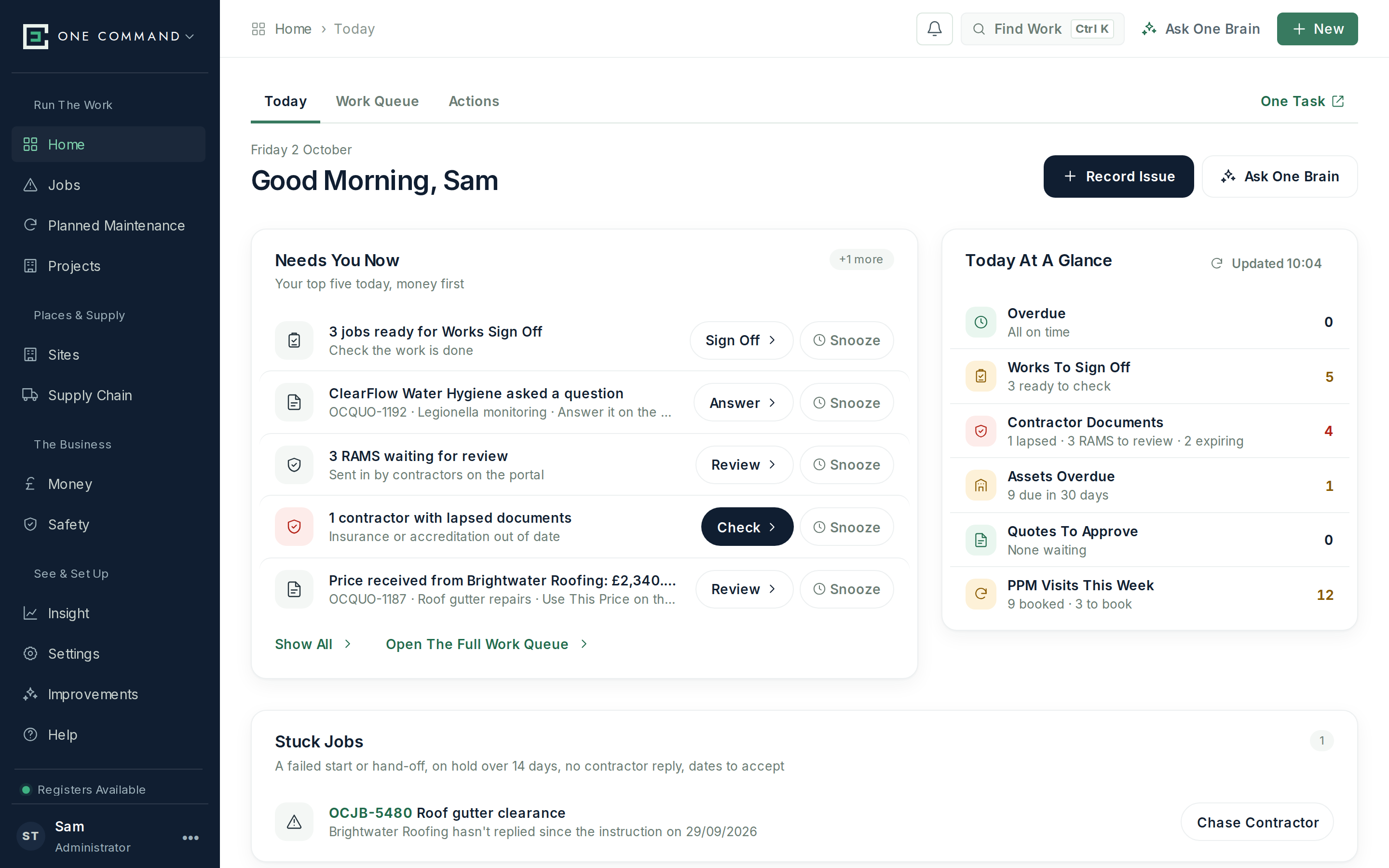
Tenants and site staff report faults by phone, email, your website or a QR label. Each one becomes a job you can follow to the end.
Send the job to your preferred contractor for that trade. They accept it, send dates and upload their RAMS in their own portal.
For bigger work, ask contractors to price it through a secure link. Compare what comes back and instruct the one you choose.
Every service at every site is scheduled, booked and checked off, with the contractor's service sheet read and filed.
A compliance score for every building. Contractor insurance and accreditations are chased for you before they lapse.
Contractor invoices are read by AI, matched to the job and paid in a weekly run, with anything over the agreed price held.
AI reads contractors' service sheets and invoices, writes the scope contractors price against, and drafts your chasers. You approve before anything is sent.
Then £2 a site a month. The whole platform and the contractor portal, however many contractors you use. One Task is an optional extra at £4 a user.
Reactive and planned work for all your clients, delivered by your own engineers, your subcontractors or both. Quote it, deliver it, prove it and invoice it, with AI doing the paperwork in between.
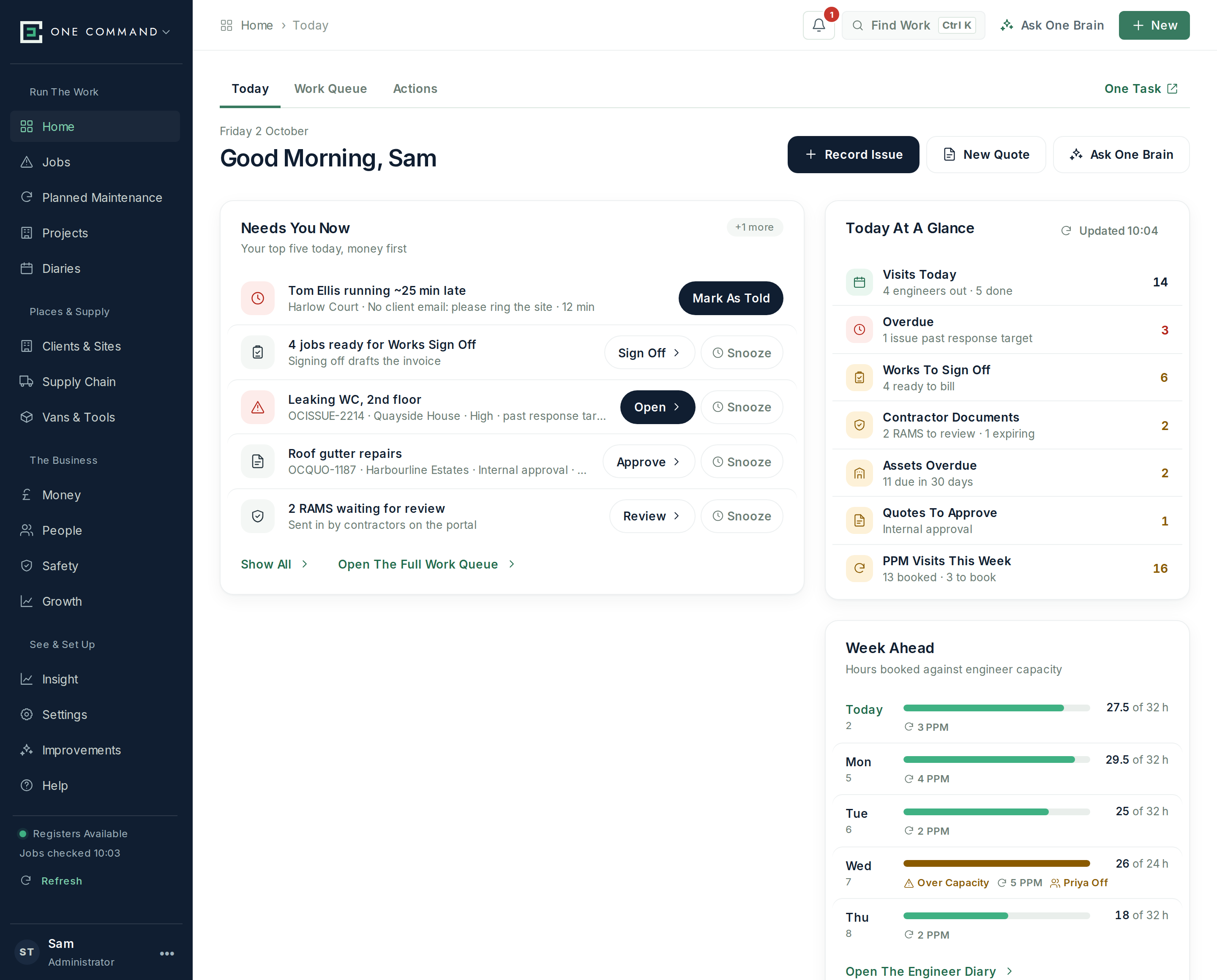
AI turns an engineer's findings into a quote scope. Clients approve it online, and reminders go at 7 and 14 days.
Book your own engineers in the diary or instruct a subcontractor. Both report back the same way.
Automatic updates at each milestone, from Issue Received to Works Booked, from your own mailbox.
Visits scheduled for every contract, fees invoiced on the 1st, and remedials turned into quotes.
Every service at every site as In Date, Booked, Due Soon or Overdue, with scores to share.
Works and Job Sign Off check every material and hour is charged. A Monday email lists anything not invoiced.
AI writes quotes, contractor scopes, engineer questions, client report summaries and invoice descriptions, and reads every service sheet and supplier invoice. People approve every step.
Count everyone who works for you, in the office and on the tools. Subcontractors never count. Plans start at two people.
Whether it's just you or a team of engineers, the office should run itself. Take the job, send the quote, do the job sheet on site, send the certificate and invoice the same day.
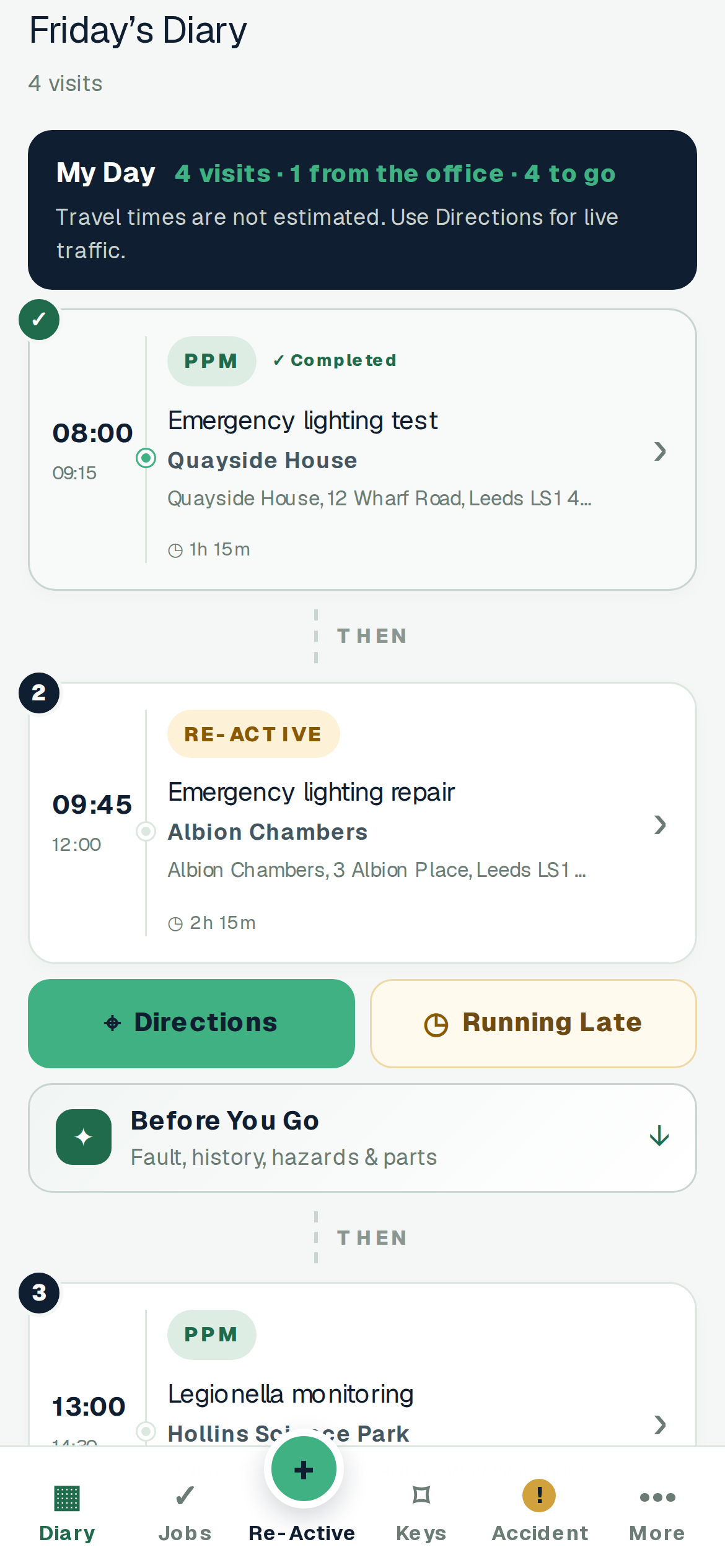
Calls, emails and website enquiries become jobs with the customer, site and history attached.
AI writes the quote scope from what you found. Your customer approves it online and is reminded if they forget.
See where you're going, with keys, access notes and the job history before you arrive.
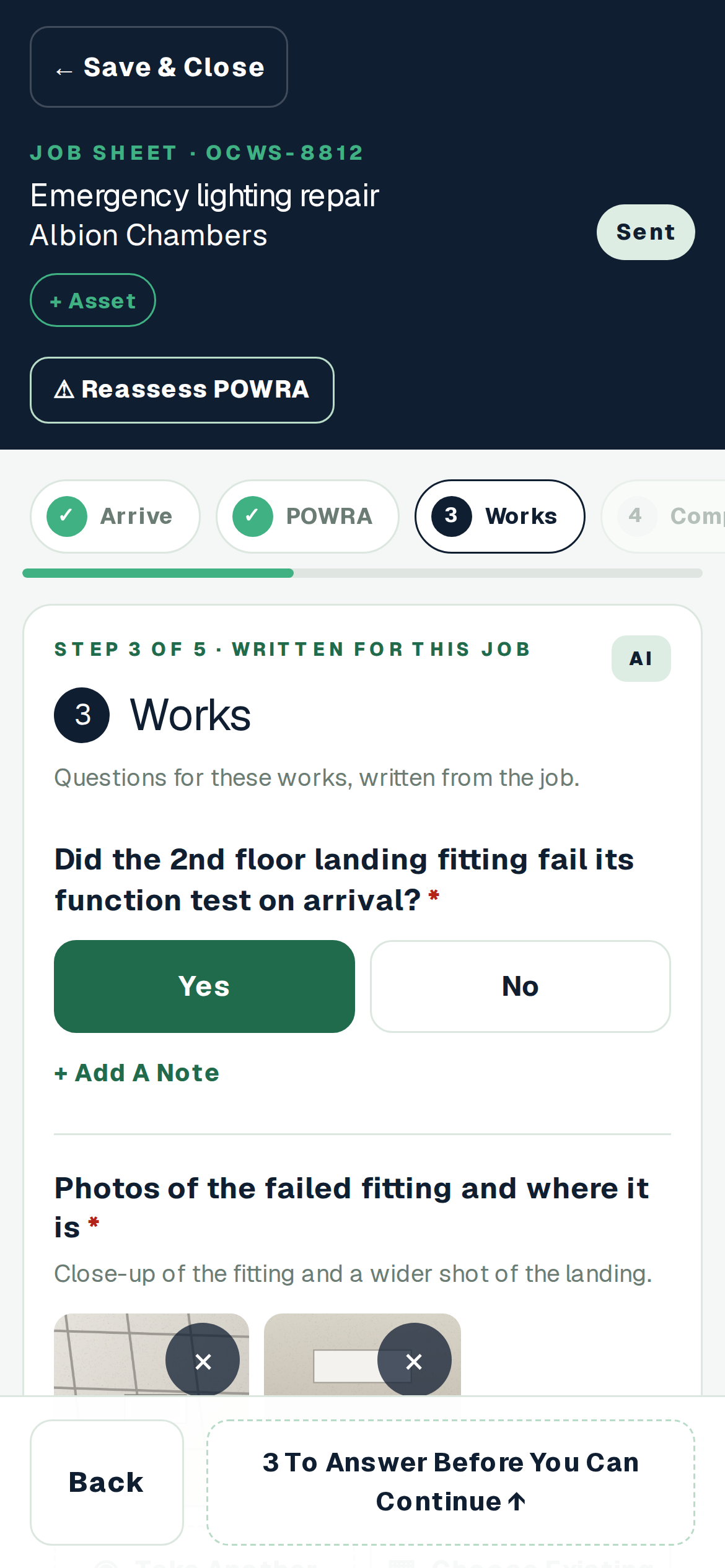
One Sheet walks you through the job with photos and a POWRA, and works without signal.
Your report and certificate go to the customer when the job's done, with your branding.
Raise the invoice in your accounting software as soon as the job is signed off. Annual services come round automatically.
AI writes your quotes and job questions, pre-fills your POWRA and writes up your report. You check it, then send it.
When a landlord or FM provider using One Command instructs you, the job will land straight in your own One Command, with the site, access and scope. Your job sheet, certificate and invoice go back to them the same way. No portals, no re-typing.
Count everyone who works for you, from a sole trader on their own to a trade business with a team. Subcontractors never count.
One Command is coming soon to the open market. Register your interest and we'll be in touch as soon as early places open.